Set up modifiers (options like milk and size)
Create option groups, the options in them, and link them to products.
Owners and managers
Modifiers are the choices staff pick when adding an item, like oat milk or a large size. They're set up in three parts, each with its own tab in Admin › Catalogue › Modifiers:
| Tab | What it's for |
|---|---|
| Options | What the guest picks, e.g. Oat, Almond, Large |
| Groups | Collections of options, with min/max picks, e.g. Milk, Size |
| Links | Which products use which groups |
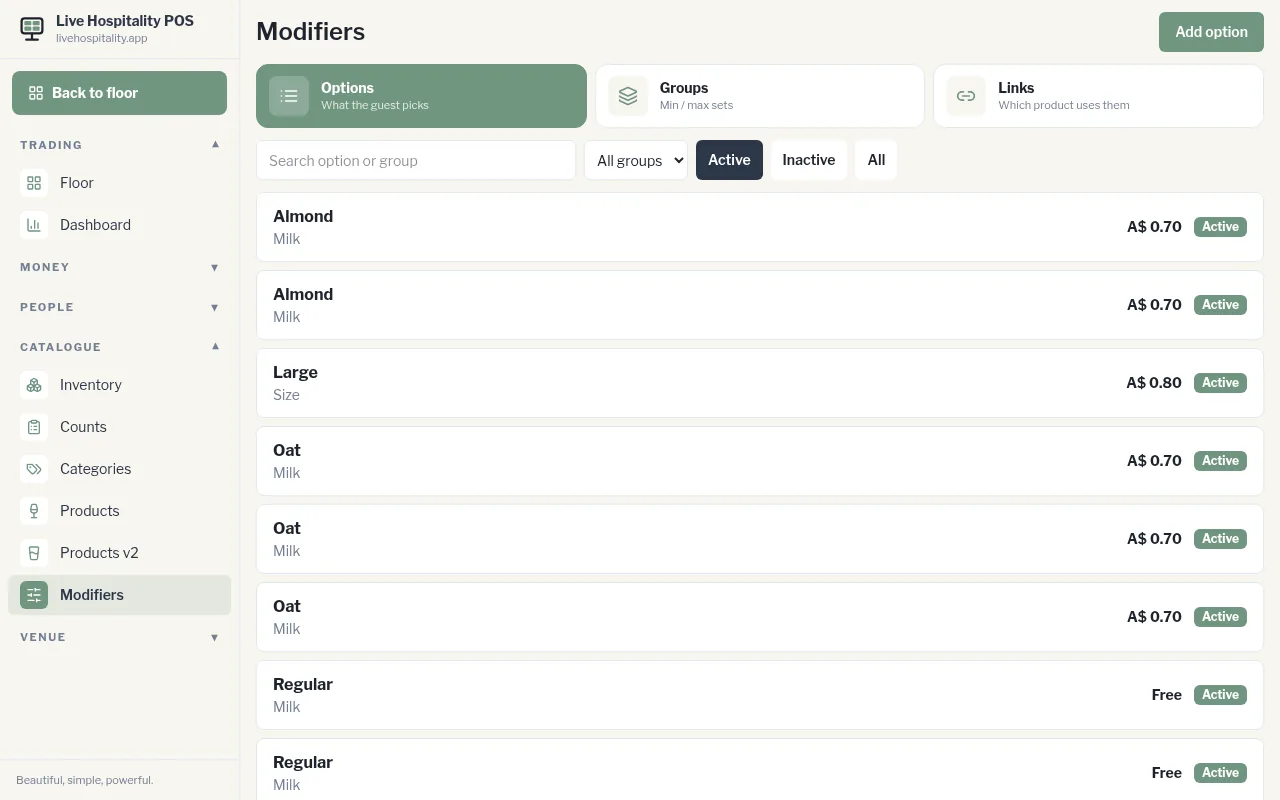
1. Create a group
- Tap Groups, then Add group.
- Enter the Name (for example “Milk”).
- Set Min (the fewest options a guest must choose; 0 means optional) and Max (the most they can choose).
- Tap Save.
2. Add options
- Tap Options, then Add option.
- Enter the Name, the Price extra (0 for free), and choose the Group.
- Optional: link the option to an Inventory item and set the Pour qty, so stock comes off when it's sold.
- Tap Save.
3. Link the group to products
- Tap Links, then Add link.
- Choose the Product and the Group, then tap Save.
You can also link groups from the product itself, under Modifiers in the product editor.